Two former Johnson & Johnson employees did something that changed everything. They blew the whistle on their own company and exposed the illegal promotion of HIV drugs that resulted in a $1.64 billion judgment against the company, as we found from the Reuters report.
All they needed was a safe, anonymous place to share what they knew.
That is what a whistleblower website does. It gives people a secure place to speak up without the fear of being exposed. It allows you to share your own story. without being targeted.
If you are a journalist or activist or you belong to the corporate world, you already know how important this is. But building that space is not simple. You need the right tools and solid security with anonymous hosting from day one.
This is where a DMCA-ignored web hosting service becomes essential for whistleblowers; it’s not like regular hosting that would respond to takedown requests. DMCA-ignored hosts do;not log your identity or hand over your data.
This kind of hosting gives the whistleblowers the safe space they need to speak the truth. We tested and shortlisted the best DMCA-ignored hosting options so you can build your whistleblower website with full confidence from day one.
What Is a Whistleblower Website?
A whistleblower website is a secure online platform where you can safely share sensitive information about any wrongdoing, be it corruption, fraud, or any kind of abuse.
Many illegal activities are happening in governments and corporations, so this platform gives people a protected space to speak the truth without revealing who they are or risking their personal and professional lives.

The biggest threat to a whistleblower website is not the truth it carries, but it is the hosting it sits on. Regular hosting complies with DMCA takedown requests and hands over your data when pressured or even shut down overnight.
This is why DMCA-ignoring hosting is the only real solution for whistleblowers. It operates outside standard legal jurisdictions and refuses takedown requests. So without DMCA-ignored hosting, your whistleblower website is only one legal notice away from disappearing.
Common Uses of a Whistleblower Website
Here are some of the most common uses of a whistleblowing website:
- Exposing corporate fraud: Like reporting financial misconduct, accounting fraud, or insider trading.
- Government corruption: Citizens leak evidence of bribery and abuse of public funds.
- Documenting police brutality: Like witnesses reporting with videos, photos, or reports of excessive force that authorities try to suppress.
- Source protection for journalists: Reporting tips anonymously or exposing sources to legal or physical risk.
- Human trafficking: Victims reporting information about trafficking networks operating officially.
Who Should Start Whistleblower Website?
Now, some common people can start this whistleblower website, like.
- Investigative journalists & newsrooms: You already have sources and legal cover with the ability to publish. A secure tip is a natural next step.
- NGOs & Human Rights Organizations: You trust the ground in the communities you serve. A whistleblower channel gives victims and witnesses a safe way to reach you with evidence.
- Corporations: A corporate world is very dynamic; you never know when you will need it, so build your website before any scam or fraud reaches you. This will be cheaper than hiring a lawyer later.
- Activities & Civic Tech Developers: You have the technical skills and the motivation. You can build open-source tools that others can deploy, especially for communities in high-risk or censored environments.
Is It Legal to Start Whistleblower Website in 2026?
Yes! It is completely legal to start your whistleblower website. But the legality also depends on where you are based and who you are publishing about.
Here are some major legal areas that you should know and consider.

Important Legal Points to Consider
Starting a whistleblower website is legal, but the law varies by country, by what you publish, and by who your sources are. Here is what you need to know before you start building.
- First Amendment and Press Freedom (US)
The First Amendment and press freedom in the United States give strong protection to the press and publishing information in the public interest. This does not mean that you are completely safe from all legal challenges because it all depends on how you obtain and publish information. - EU Whistleblower Protection Act
The EU requires member states to protect whistleblowers who are involved in reporting EU law breaches. So, if you operate in the EU or you accept tips from EU-based sources, you should be aware of your obligations to protect those sources. - Defamation & Libel risks
If you publish unverified information, then it can expose you to defamation or libel claims. Always try to publish what you have verified. Libel laws are very strict in the United Kingdom, so most often it happens that the burden of proof falls on the publisher and not on the claimant. - Data Protection (GDPR & CCPA)
If you collect any data from users in the EU or California, GDPR and CCPA will apply. This means you must handle personal data very responsibly, store it with full security, and be very transparent about how it is used. - Shield Laws and Source Protection
There are some US states that have shield laws to protect journalists from being forced to reveal their sources. This can vary by state, but it will not always cover the independent online publisher. In fact, in the EU and UK, source protection rights exist but are still not absolutely active.
Do keep in mind these legal points, as you should be clear of everything before you start your website, your protection, the type of content, and jurisdiction differences.
You cannot miss a single aspect.
Why Legal Guidance Matters
The legal risks of running a whistleblower website are real, but most of them are avoidable.
It is possible that what is allowed in one country can be sued in another, and small mistakes around defamation and data protection can turn into serious problems very fast.
| As we found out from The Guardian report, The Gateway Pundit is a case where the site faced multiple defamation lawsuits and was forced to file for bankruptcy in 2024. The problem was not that they published. It was that they published unverified claims without the editorial standards that could have protected them. |
Every major legal aspect related to the whistleblower website is very important. You don’t need to be a lawyer, but you need to understand the basics. We even recommend talking to a lawyer before you go live.
A media law attorney can guide you and spot the gaps in your setup and can even tell where you can be exposed. They can even help you build something that can last longer.
How to Start Whistleblower Website In 2026? Step-by-Step Guide
To start whistleblower website, you definitely need to keep in mind certain major steps that you need to follow.
You have to focus closely on each step since it’s a long process from choosing your niche to the platform where you will be hosting your website.

1. What Type of Whistleblower Website Do You Want to Build? Choose Your Niche First
You need to be very clear when you are thinking of choosing your whistleblower website.
Here, we will help you choose your niche from the most common areas.
1. Journalism-Based Whistleblower Website
A journalism-based website is a secure platform where you can share news and any kind of reports. It allows you to share trending updates with your readers and even target the issues that the government could be hiding.
It is built for reporters and news organizations who want sources to safely leak sensitive information.
A good example is SecureDrop, which is used by major news outlets like The Guardian and The New York Times to receive tips anonymously and securely.
2. NGO or Human Rights Reporting Website
An NGO or human rights platform is a secure platform where you can easily report social issues or injustice, or if you face any kind of abuse or harassment.
It also deals with your human rights issues and keeping them safe.
Platforms like GlobaLeaks are mostly used for helping people report abuses safely without any fear.
3. Corporate Whistleblower Portal
A corporate whistleblower website or portal is known to be a secure website. Here, the employees, clients, and even insiders can report about their various issues that could be unethical for them.
You can make reports, such as any kind of fraud and workplace harassment.
The different regulations, like the Sarbanes-Oxley Act (SOX) and the EU Whistleblower Directive, require many businesses to have this portal.
4. Public Anonymous Reporting Website
A public anonymous reporting website is a broad place where you can report crimes and scams. You can report anything here, like reporting fraud and safety concerns or social issues. It does not reveal your identity.
This kind of website will provide you with a safe and secure way to share important information without any fear or pressure. It will help communities and authorities receive valuable information while protecting the reporter’s privacy.
2. Key Features Every Whistleblower Website Should Have
Once you decide on your niche, the next step comes where you need to understand what the major criteria are that you need to focus on before starting your whistleblower website. It needs true anonymity and end-to-end encryption for privacy.
Here’s the breakdown of major features:
Anonymous Submission Form
The standard contact forms are quite dangerous. They log your IP address and route your data to third parties, which can even be subpoenaed later. So you should use SecureDrop, trusted by major newsrooms.
Another is GlobaLeaks, which is easier to self-host, or you can use a custom end-to-end encrypted form. Then host it on an .onion address and ensure there is zero identifying data. It should have no IP logging with no logins and no metadata.
Encrypted Communication
If your communication is not encrypted, messages and files can be easily intercepted in transit or accessed through your email provider.
You should always use Signal for automatically locking your messages and sharing your PGP key for encrypted email. You can even let SecureDrop handle encryption automatically. Just try to make it very clear to sources which option will protect them the most before they reach out.
Secure File Upload System
Every file has hidden metadata and author names with timestamps. These things can easily expose a source, so your upload system must be entirely separate from the submission form and must automatically remove all metadata.
SecureDrop can handle this very well naturally. Other than this, you can even integrate MAT2 or ExifTool in your workflow.
No Unnecessary Tracking
There should be no unnecessary tracking, like no Google Analytics and no Facebook pixels, as they track users across the website. It is known to be a very easy trail, so you should remove all external analytics and ad scripts that are unnecessary.
If your usage data is needed, then you can use Matomo, which is self-hosted, and here, no data leaves your server. You should audit every script on your site and disable server-side IP logging wherever it is possible.
Clear Submission Policy
Your users should clearly understand the report submission policy, like what type of reports are accepted and how the information will be handled. A submission policy should clearly explain the following:
- What users can report.
- What content could be published?
- How reports are reviewed.
- Anonymity level for reports.
All these points bring transparency and reduce misuse of the platform, and it also helps in building user trust.
Source Safety Page
A source safety page is where you educate your users on how to protect themselves before submitting sensitive information. This is an important section for your users, and you can refer to these tips, such as:
- Use a Tor browser.
- Removing metadata from files.
- Avoiding workplace internet connections.
- Using anonymous email accounts if needed.
This feature shows that your platform genuinely cares about whistleblower protection.
Admin Review Dashboard
Website administrators require a secure admin review dashboard where they can review and manage the incoming reports. You can use SecureDrop’s built-in admin interface or build a separate system. A good and secure dashboard should have:
- Strong anonymity.
- Report status tracking
- Secure team access controls.
- Evidence review options
- Internal communication system.
If you want to make a successful website, you must focus on privacy and security. It should grant anonymity at its best level to make your users confident and trust your website so that they can freely discuss their issues and submit reports.
3. Choose the Right Platform for Your Whistleblower Website
Now, here we will help you in choosing the right platform. Choosing the right platform for whistleblowers does have some major areas that you can consider, like the following:
Let’s move forward.
WordPress-Based Whistleblower Website
A WordPress-based website is the easiest and most affordable way to build your whistleblower or reporting website. It issues specialized plugins and security tools and combines them with the core CMS.
You can include their dedicated whistleblowing features or plugins, like
- Whistleblowing & Contact Form, a plugin that allows easy anonymous submissions with secure file uploads.
- A trusty whistleblowing solution is used if you need built-in case management tools to upload files securely.
Best for
It is best for:
- NGOs and small organizations.
- Awareness and reporting portals.
Custom-Built Whistleblower Platform
A custom-built platform is a tailored place that is developed from scratch using frameworks and programming languages.
It is based on security and functionality requirements, designed specifically for employees and contractors to submit their reports anonymously. It costs more and can take a longer time.
Best for
It is best for:
- Large organizations and enterprises.
- Advanced anonymous reporting platforms.
SecureDrop-Based Whistleblower System
SecureDrop is an open-source whistleblower submission system specifically designed for journalists and media organizations. It is used by at least 60 news organizations worldwide, including The New York Times and The Washington Post.
Here you can safely and anonymously receive documents and tips from sources. Your server is completely owned here. It uses strong encryption and privacy-focused technology to keep it safe from hackers.
Best for
It is best for:
- Investigative journalists’ platforms.
- High-risk whistleblower submission.
4. Choose Privacy-Focused Hosting for Your Whistleblower Website
When you are building your website, choosing the right hosting provider is extremely important. Whistleblower deals with sensitive reports and confidential information, so your hosting should be privacy-focused. It must have strong security with anonymity to keep your data protected.
Your privacy-focused hosting should have SSL certificates and stronger server security with better uptime and performance.
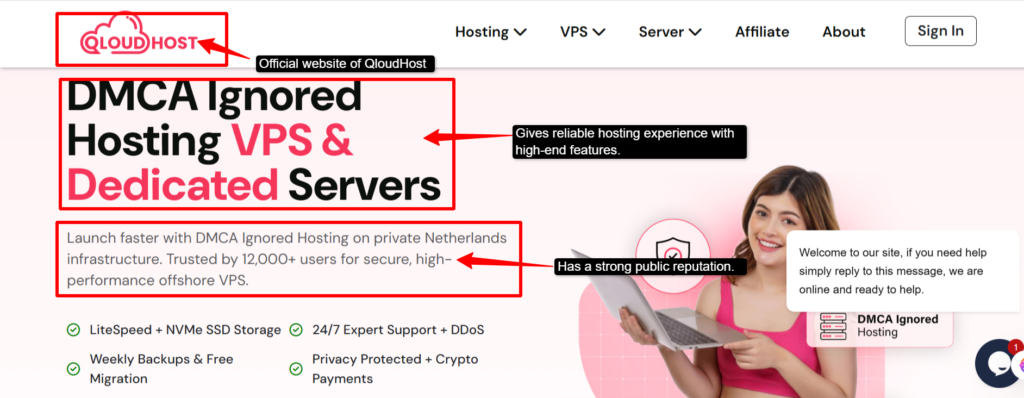
Many website owners choose platforms like QloudHost for privacy-focused hosting because they offer VPS and dedicated hosting solutions with better control, performance, and tight security. This platform could be very useful for whistleblower websites that require uptime stability and strong resource management.
Why Normal Hosting May Not Be Enough?
A normal host is never enough because it does not provide the level of security that is needed for an anonymous reporting system. Protection and anonymity are very critical, which cannot be fulfilled in normal hosting; this is the reason why people switch to privacy-focused hosting solutions.
What to Look for in Whistleblower Website Hosting?
There are certain factors that you should look for in your website hosting, like:
- Strong Uptime SLA
- No logging policy
- Offshore/privacy-friendly locations
- DDoS protection
- Tor .onion support.
- DMCA-resistant policies.
If you are running a site where people want to share sensitive information, standard hosting could always be risky. You need a host that does not keep records and is based in a privacy-friendly location.
Why QloudHost Can Be a Good Option for Whistleblower Website Hosting?
If you are searching for good hosting options for your whistleblower website, then you can consider QloudHost as your starting point. It could not be the perfect solution, but it does have major aspects, so you can start your hosting journey.
It covers at least two of the major bullets that we have mentioned above, such as the following:
- Strict no-logging: QloudHost follows strict data protection policies and avoids unnecessary logging.
- DMCA-resistant policies: Their servers are located in the Netherlands, and they operate under an offshore jurisdiction that does not automatically follow DMCA takedown requests. It simply means that your site is less likely to be pulled down under legal pressure.
Privacy-focused hosting helps keep the whistleblower website stable and better protected. There are many options for DMCA Ignored hosting, but QloudHost can be a good option because it delivers all the requirements in real time.
5. Which One Is Better for a Whistleblower Website? – VPS vs Dedicated Server
If you want to start your whistleblowing website, a VPS (Virtual Private Server) is considered better for your starting point. It brings a good level of privacy, and you get to control your own private server.
Your resources can be isolated with root access to configure the strict anonymity measures. VPS even comes as an affordable option compared to the costlier dedicated server.
When to Choose VPS Hosting?
You should choose VPS hosting when:
- You are starting a new whistleblower website.
- Your traffic is moderate.
- You need better security than shared hosting.
- You need more control.
When to Choose a Dedicated Server?
You should choose a dedicated server when:
- Your platform handles highly sensitive reports or leaks.
- You expect very high traffic or large file uploads.
- You need stronger performance, like an enterprise-grade level.
- You require advanced security configurations.
Recommended Setup for Beginners
If you are a beginner and looking to set up your website, then you can start building a WordPress-based whistleblower website, where you can start with a secure VPS setup. It is usually the best option. It has better flexibility and security for your future growth.
Many users prefer providers like QloudHost for VPS hosting because of their privacy-focused infrastructure with offshore hosting options and scalable server resources.
6. Plan the Website Structure Before Launch
Before launching your website, it is important to plan a clear and secure website structure. It should have well-organized pages to help your users understand the platform and how they can submit their reports safely.
- Homepage: This page introduces the purpose of your whistleblower website, explaining what your users can report and guiding them also towards secure report submission.
- Submit a Report Page: It should provide a secure and simple form where you can anonymously submit reports, evidence, or any sensitive documents safely.
- How It Works Page: Now, here you explain the reporting process clearly, including how reports are reviewed and protected and how they are handled after submission.
- Source Safety Page: You have to be completely honest here. Tell people what you protect them from and what you cannot guarantee. You should never overpromise here.
- Editorial or Review Policy Page: Here, you describe how reports are verified. You should clearly mention what you can publish and what you cannot. This shows your seriousness about your site.
- Privacy Policy Page: Clearly explain here what data is collected, how the information is stored, and what user privacy protection levels are present. It should clearly mention whether anonymous submissions are supported or not.
- Contact Page: Don’t use a regular contact form. You should use something that is encrypted, like ProtonMail, or share a PGP key so people can reach you safely.
7. Secure Your Whistleblower Website
Once you launch your website, you need to take certain safety measures to secure your whistleblower website.
We have given it in clear headings so you can understand easily.
Use an SSL certificate.
You can install a free SSL certificate through Let’s Encrypt. It will encrypt all the data that is traveling between your site and the visitors. You should also enable HSTS (HTTP Strict Transport Security) to force the browsers to always use the secure version of your site.
Never think that just using SSL can protect your site; it will only protect your data in transit, but will not provide security for your server.
Keep Software Updated
Always keep your CMS, plugins, and server packages updated. You should enable the automatic updates wherever it is possible. Hackers mostly look for one slip of a mistake you make, especially in outdated software, so make sure you are always updated.
Even an unpatched plugin or an old server package is a big vulnerability for your entire platform.
Use Strong Admin Passwords and 2FA
Always use a password manager like Bitwarden or 1Password, where you can create long and unique passwords for every account. Don’t forget to enable two-factor authentication (2FA); you can use an authenticator app like Google Authenticator, but not SMS.
It can be intercepted very easily. Use these measures, and even if your password gets stolen, no one can get in without your phone.
Limit Admin Access
Grant only the permissions each role requires. Keep your admin accounts to a minimum when someone departs. Every extra account is an extra point of failure.
Avoid Unnecessary Plugins
Every plugin is an extra code that you don’t need to control. Remove anything non-essential. Use only well-maintained extensions from reputable sources.
Choose plugins that can be maintained and easily audit your list regularly. Don’t keep anything unused; an inactive plugin could be as dangerous as an active one if it’s not updated.
Use Secure Backups
You should back up regularly, encrypting everything and storing copies of all of it. Apply the 3-2-1 rule, where you should at least keep three copies, one on two different devices, and one off-site.
Your system should not store IP addresses. Make sure you enforce HTTPS, because a backup is worthless if it cannot be restored.
Monitor Server Activity
You should regularly keep monitoring your server activities and enable alerts wherever it is possible. You can even set up intrusion detection tools like OSSEC or Fail2Ban so you can watch any suspicious behaviour like repeated failed logins or unexpected traffic rise. Always use log monitoring.
The faster you can detect any attack, the less damage it can cause.
8. Content Strategy for a Whistleblower Website
Let’s figure out how you can plan your content strategy so that it doesn’t disappoint you once it is live. After features and security, content strategy is also very critical.
- Publish Educational Guides
Create guides for sources explaining how to submit reports safely and protect their identity. Tell them about how to prepare evidence before blowing the whistle. This will help your users to feel safer while also building trust and organic search traffic. - Publish Transparency Reports
You share regular transparency reports showing how many submissions were received or reviewed and how many were acted upon without exposing the sensitive information. If you report consistently, it will help in building long-term credibility and public trust. - Publish Verified Investigations
Only publish those investigations and claims that can be properly verified through evidence and fact-checking. You need to briefly explain your verification process to readers and focus on quality over quantity to maintain your website’s reliability. - Build Topical Authority
Build your topical authority, where you should cover related topics like whistleblower laws and famous whistleblowing cases, and it should also include cybersecurity awareness. You should explain how to have digital privacy and use protection tools.
This will strengthen your authority in your niche and improve your content relevance.
9. SEO Strategy for a Whistleblower Website
A strong SEO strategy will help you to build your website’s visibility and trust with long-term authority. Your niche should focus on credibility and sensitive information, and your content should focus on accuracy and user trust.
Mentioned below are some SEO measures you can take for your website:
Target Informational Keywords First
Start by targeting informational search queries using phrases like “how to” and “what is” because your users often search for guidance before submitting reports.
- How-to Keywords (e.g., How to report corruption anonymously).
- Educational keywords (e.g., What is whistleblower protection?)
- Safety keywords (e.g., How to submit evidence safely)
- Legal keywords (e.g., Is whistleblowing legal in 2026?)
Use Trust-Based Content
EEAT (Experience, Expertise, Authoritativeness, and Trustworthiness) is essential. Here you should cite reliable sources, explain your review process, and be transparent about who manages the platform to build reader confidence.
Add Author Bio and Editorial Policy
Use named authors only with their relevant credentials wherever it is possible, and even include a clear editorial policy page where your users can easily understand the content standards with fact-checking. It should clearly mention the report verification practices.
Use FAQ schema.
You should use FAQ structured data to improve the visibility in search results and increase the chances of appearing in featured snippets for queries like “Is it legal to report anonymously?” or “How does whistleblower protection work?”
10. Launch and Maintain Your Whistleblower Website
Now, after following all these steps and before launching your website, make sure your platform is secure and legally reviewed. It should be fully tested. If you properly launch it, the process will help to protect your users’ privacy and improve trust from the beginning.
Here’s a breakdown of this last step:
Pre-Launch Checklist
Here is your checklist that you should go through before launching your website:
- SSL certificate active & HTTPS enabled.
- All important pages are live and proofread.
- The anonymous submission form is fully tested.
- Legal and privacy review completed.
- Admin accounts are protected with 2FA.
- Privacy policy and editorial policy published.
- No unnecessary analytics or tracking scripts.
How to Onboard Your First Sources Safely?
Share the platform carefully through only trusted communities, journalists, and NGOs. Always avoid aggressive promotions because they could even expose sensitive users and their data or create unnecessary tracking trails.
Don’t leave any tracking trail. Use end-to-end encryption and strip metadata from any shared materials, and use an .onion address at the primary shared point.
Ongoing Maintenance Best Practices
There are some maintenance prices that you should keep in mind, like:
- Perform security audits regularly.
- Monitor suspicious activity.
- Publish reports regularly for transparency.
- Keep reviewing the legal and editorial policies.
Your whistleblower website is not like you launch it once and forget it. It needs continuous security and transparency should always be maintained for long-term trust.
Common Mistakes to Avoid When Starting a Whistleblower Website
When you are building your first whistleblower website, it requires more than you even think. It’s not just launching a reporting form, but there could be mistakes related to security and hosting.
If any damage is made in the verification process, it will affect the user’s trust and create legal or operational risks.
- Launching Without Legal Review
If you skip the legal review before launching, it can lead to defamation risks and privacy violations. Before launching your website, always review your reporting policies and privacy terms. Also, focus on the content guidelines with legal professionals if required. - Using Cheap Normal Hosting
Basic shared hosting may not provide you with the security your website actually needs. These websites with sensitive information require stronger security, which cheap normal hosting cannot provide. It has shared server infrastructure and weak logging with poor protection, which can easily expose your data. - Collecting Too Much User Data
You need to collect only the user data that is required for reporting. If you store unnecessary personal data or IP logs, it can easily increase the risk of leaks and privacy breaches. Always use a privacy-focused approach. - Publishing Unverified Claims
This action can easily harm credibility and create legal problems. Always verify your reports with evidence or various sources before making the information public. - Ignoring Website Security
Never ignore your website security because it exposes sensitive reports and source identities. Always make regular audits with strong admin protection. Software updates are also very important for protecting both the platform and your users. - Making Unrealistic Anonymity Claims
Never aim for 100% anonymity because no online system is completely risk-free. Instead, you should be transparent about your security measures and educate your users on safe practices like using VPNs and secure browsers.
How Much Does It Cost to Start Whistleblower Website?
Starting your whistleblower website requires both technical and financial decisions. It is a commitment to security, source protection, and reliability. Here is a breakdown of it:
- Domain Name Cost
You can expect it to cost $10-$20/year for a standard domain through registrars. You can even use Njalla, which is an anonymous domain registrar built for privacy and a place that supports anonymous payments and offers encrypted VPN tunnels. - Hosting Cost
Hosting is your most crucial infrastructure choice. Shared hosting is generally not recommended for your website as you need isolated, privacy-focused infrastructure.
QloudHost is a strong option for this use case as it accepts cryptocurrency and prioritizes privacy first.
⇒ VPS: All their VPS plans use KVM virtualization with NVMe storage and have a 14-day money-back guarantee with free SSL and 24/7 support. It starts from $18.99/month, suitable for low to medium traffic.
⇒ Dedicated Servers: It is best for high security and high-traffic platforms. You don’t have any shared resources here, and it starts at QloudHost for $167.99/month for higher-tier configurations. - Website Development Cost
A basic secure site using an open-source CMS (WordPress + SecureDrop, or a custom static site) can cost around $0-$500 if it is self-built.
But if you hire a developer, then it ranges from $500 to $5,000+. It even depends on your submission system integrations. - Security Tools Cost
There are some major security tools, like:
⇒ SSL certificate: Free via Let’s Encrypt
⇒ WAF (Web Application Firewall): $10-$50/month
⇒ Intrusion detection/server monitoring: Free, open-source options are available. - Legal Consultation Cost
Before launching, always consult a lawyer who is familiar with press freedom and whistleblower protections.
A one-time consultation can cost around $200-$500. But for a serious investigative outlet, it can cost around $1000-$5000+/month. - Maintenance Cost
The more important the launch is, the more it is like maintaining it as well. You have to maintain it for updates, backups, and monitoring. It even includes the security audits.
⇒ Self-management can cost around $0-$50/month with tools.
⇒ Professionally managed can cost around $100-$500/month, depending on the scope.
Total Estimated Budget Summary
You will see a clear and concise table, which is the estimated budget summary for all kinds of users.
| Category | Minimal (DIY) | Mid-Range | Professional |
|---|---|---|---|
| Hosting | $15-$100/mo | $200-$500/mo | $500-$1200/mo |
| Platform/Software | WordPress (Free) | $100-$300/mo | $500-$2000/mo |
| Legal Consultation | None | $500 – $100/mo | $500-$2000/mo |
| Security Setup | Free plugins | $300-$800/mo (freelancer) | $1000-$3000/mo (agency) |
| Maintenance | Self-managed | $500- $1000/mo | $2000-$5000/month |
Regardless of your budget, never compromise on your hosting and security. Starting a whistleblower website is not an easy task, but if you are, then don’t even miss a single point of consideration.
FAQs
What is the best platform or software to build a whistleblower website in 2026?
SecureDrop is the best choice for newsrooms, GlobaLeaks for your NGOs, and WordPress with encryption plugins is a great choice for simple setups. Your choice completely depends on how much technical knowledge you have and how sensitive the leaks will be.
Can I use WordPress for a whistleblower website?
Yes, but you must harden the security. You should use encrypted contact forms and remove all unnecessary plugins. Always choose privacy-focused hosting and never use regular shared hosting for this purpose.
What is the best hosting for a whistleblower website?
You should always go with a privacy-focused VPS or dedicated hosting that has a strict no-logging policy and is based in an offshore jurisdiction. QloudHost is a strong option as it offers offshore hosting with strong privacy protection.
How do I ensure absolute anonymity for sources submitting leaks?
Absolute anonymity is impossible, but you can get very close to it. You should use no-logging forms, support Tor access, and strip any metadata from all uploaded files. You should even educate your sources to use the Tor browser and avoid any personal devices.
What legal protections apply to whistleblower websites?
It all varies by country. Like in the US, the First Amendment and shield laws bring some protection, while in the EU, Directive 2019/1937 covers whistleblower rights. So always try to consult a media law attorney before you decide to launch your site.
Can I use standard hosting providers for the whistleblower website?
Yes, you can use it, but honestly, it could have been quite risky. Standard providers log users’ activity and quickly comply with legal subpoenas. This can easily expose your sources and get your site taken down instantly.
Why is QloudHost suitable for whistleblower website hosting?
QloudHost is very suitable; it offers an offshore jurisdiction based in the Netherlands. It has a strict no-logging policy and DDoS protection. It delivers all the features that are considered critical for a whistleblower website.
How do I verify the authenticity of leaked documents without risking safety?
You should always work with metadata-stripped copies when you are analyzing documents. Always cross-reference the content with public records and also verify facts. You should never contact the course through any channel that could be monitored or traced.
Conclusion
Building your whistleblower website is like being committed to your sources and truth. It is also about keeping both of them protected even after you publish it.
You can easily learn and understand the technical side, such as encryption, report submissions. But the most important thing you need to consider is the responsibility that comes with launching such a website.
Someone will eventually trust your platform one day, but one mistake can cost them their job or worse, their own safety. So you know, building your site is one of the most critical steps.
Focus on every aspect that we have mentioned, analyze it carefully, and then only make your decision. If you are actually looking for some guidance on how to start your own website, then definitely you can refer to this guide and gain every useful insight relating to your whistleblower website.
Build your site carefully and never stop looking after it once it is live.