Let me ask you something.
You scroll through Twitter, see a dog meme, and two days later someone turns it into a coin worth millions. Actually, that is the meme coin world in 2026.
Fast, unpredictable and yes, it can make you serious money. But here is what most guides skip. The biggest problem creators face is keeping their meme coin website online.
Regular hosting providers shut you down. DMCA notices come flying in. Your site disappears overnight.
I am going to solve that problem for you. I will show you exactly how to start a meme coin website from scratch, keep it live without worrying about takedowns, and do it all in just a few dollars per month.
| You do not need to spend thousands on licensing fees. I will tell you everything about privacy-focused, DMCA-ignored hosting that keeps your meme coin website online no matter what. Think of it as your bulletproof jacket of the internet. |
We will cover everything: picking your blockchain, designing your cryptocurrency website, writing a whitepaper and adding trust signals.
Every step is written like I am sitting right next to you. By the time you complete reading the guide, you will know exactly how to start a meme coin website that looks professional and costs almost nothing to run.
Ready? Let us go.
What Is a Meme Coin?
A meme coin is a cryptocurrency born from internet culture or viral joke moments. Dogecoin started as a joke based on the famous Shiba Inu dog meme. Then came Pepe, Floki, Bonk and hundreds more.
Meme coins are not traditional investments backed by tech infrastructure. They are powered by community and storytelling. What makes them unique is speed.

A meme coin can go from zero to millions in market cap within 48 hours if the right people share it. The meme coin total market cap crossed $47 billion in early 2026, with over $9 billion in daily trading volume.
That is serious money. And every project behind these coins needs one thing only: AND THAT IS: a website that stays online.
Why Every Meme Coin Project Needs a Website?
You might wonder if a Twitter account and a Telegram group are enough.
They are not. Your meme coin website is your base. It is the first place investors, community members and media look before trusting your project.
Without a website, you look like a scam. Simple as that.
A proper website:
It proves you are serious about what you built. When someone searches your coin name, your official coin website needs to be the first result.
Think of it like this:
Every credible meme coin has its own cryptocurrency website. Yours should too.
Which Type of Hosting Do Meme Coin Sites Need?
Here is where most beginners make a mistake.
They sign up with a regular provider like GoDaddy or Hostinger, build their site and then get hit with a DMCA takedown notice. Many mainstream hosts ban cryptocurrency content.
What you need is DMCA-ignored hosting. This is offshore hosting that operates outside U.S. copyright enforcement jurisdiction. Providers like QloudHost are based in the Netherlands, meaning they are not forced by the U.S. DMCA laws.
DMCA stands for Digital Millennium Copyright Act.
It is a U.S. law that allows copyright holders to demand takedowns of content they claim infringes on their rights. Offshore DMCA-ignored hosts simply do not act on these notices.
For your crypto website, this means you stay online.
| PLEASE NOTE DMCA-ignored hosting is legal. These DMCA Ignored hosting providers operate in countries where they are not required to comply with the U.S. DMCA law. As long as your content does not violate the local laws of the server country (Netherlands in QloudHost’s case), you are fully within legal bounds. |
Why Meme Coin Websites Are Exploding in 2026
The numbers are impossible to ignore.
In such a scenario, having a live, professional meme coin website gives you an enormous advantage.
Your cryptocurrency website becomes the credibility signal that converts visitors into loyal holders. The window to capture attention is small. Sites that go down at the wrong moment can destroy a launch.
How to Start a Meme Coin Website? Step-by-Step Guide
Now I will take you through exactly how to start a meme coin website from the very beginning. Each step builds on the last.
Follow this like a checklist and you will have a live site ready to launch.

Step1 – Define Your Meme Coin Concept & Branding
Every successful meme coin starts with a story.
Before you touch a computer, you need to know what your coin is about, why it exists and who it is for.
Start with your meme concept.
The concept needs to make people laugh or instantly understand it when they see it.
Pick a name that is short and memorable. Think DOGE, PEPE, FLOKI. Under six characters works best. It needs to look good on a coin logo and fit naturally into a tweet.
Then build your branding.
You need:
These carry across your website, social pages and community graphics. Ask yourself: what is the vibe? Funny and sarcastic? Aggressive and hype-driven? Wholesome and community-focused?
The design tone of your entire website follows from this decision.
| Example: If your coin is called FATCAT, your vibe might be a chubby cartoon cat in a suit sitting on gold coins. That visual identity should flow through every single page of your meme coin website. |
Step 2 – Choose the Right Blockchain for Your Meme Coin
Your meme coin needs to live on a blockchain.
A blockchain is a public digital ledger where all transactions are recorded permanently. You are creating a token on top of one of these networks. Your three main choices in 2026 are Solana, Ethereum, and BNB Chain.
| Block-Chain | Why Meme Coin Creators Choose It? |
|---|---|
| Solana (SOL) | Cheapest fees, fastest launches. |
| Ethereum (ETH) | Most trusted, largest global audience. |
| BNB Chain (BSC) | Cheap fees, large Asian audience, popular for smaller budget launches. |
Most new meme coin projects in 2026 are launching on Solana because fees are almost zero and the community is the most active for viral launches.
Tools like Pump.fun let you launch in minutes. Once you choose your blockchain, you create your token and that token needs a home on your website.
| DISCLAIMERCreating and launching a meme coin carries risk. This guide covers website creation only. Consult a legal advisor before launching any cryptocurrency token to a public audience. Or you can even Go for DMCA-ignored Hosting service by QloudHost to escape all kinds of Meme coin website removal risks. |
Step 3 – Register Domain Name & Hosting for Your Meme Coin Website
This is the most critical step.
Get this right and your meme coin website stays online through everything. Get it wrong and you could lose your entire community overnight.
I will break this into two tasks:
Part A: Registering Your Domain Name with YouStable
A domain name is your website address. Something like fatcatcoin.com or memecointoken.io. I recommend registering your domain through YouStable. Here is why YouStable makes sense for meme coin projects:
How to register your domain on YouStable:
- Go to YouStable.com >> Navigate to the Domain Registration section.
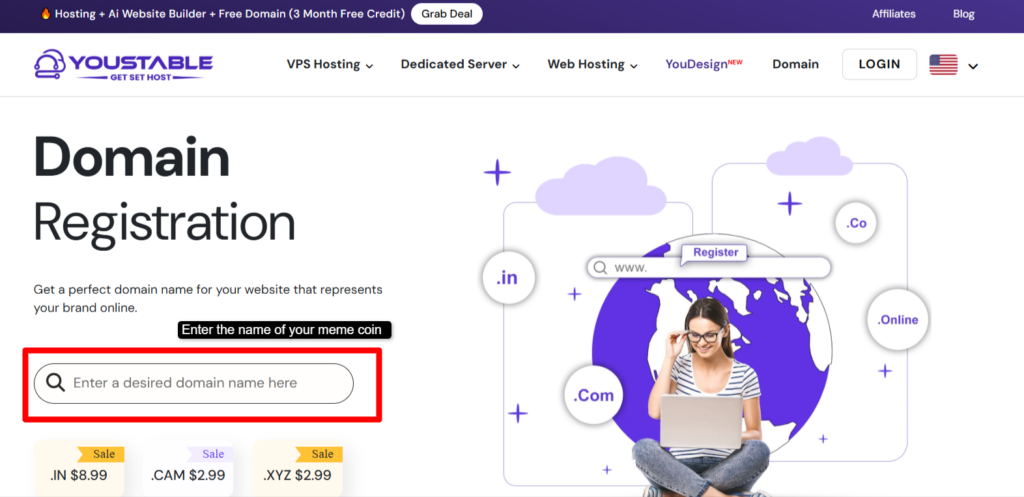
- Type your desired coin name in the search bar >> Example: fatcatcoin.com >> Choose your extension. For crypto projects, .com, .io, and .net work best.
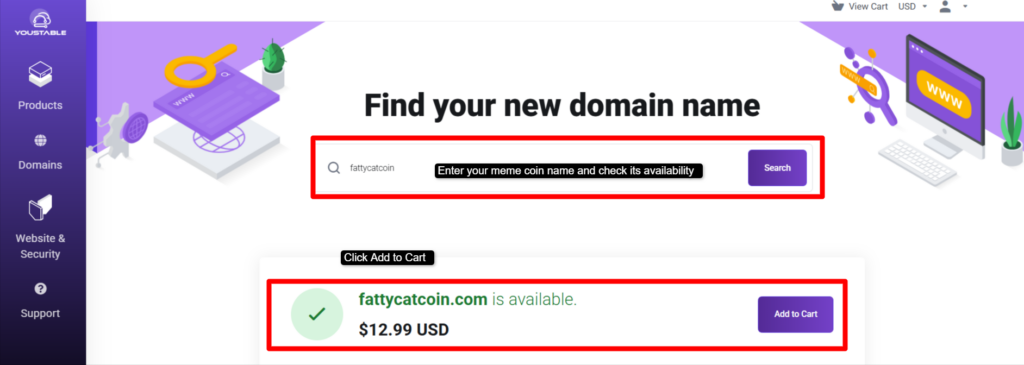
- Add the domain to your cart >> Check if any active hosting plan includes a free domain.
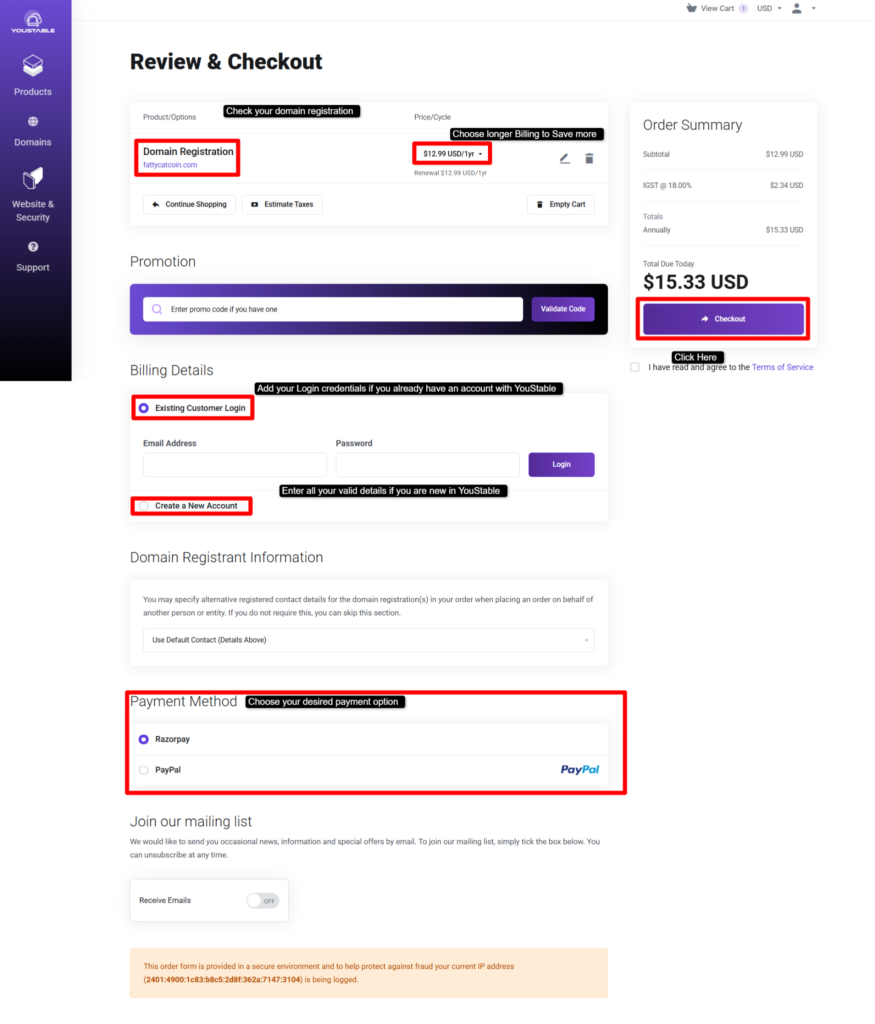
- During checkout, enable WHOIS privacy protection. On YouStable, this is free >> Complete payment and you will have access to your domain dashboard within minutes.
| Pro tip: Keep your domain name the same as your coin name. If FATCAT.com is taken, go for fatcattoken.io or getfatcat.com. |
Part B: DMCA-Ignored Hosting with QloudHost
Now for the most important part of this guide. You need hosting that will not shut you down. For your meme coin website, I recommend QloudHost.
QloudHost is a Netherlands-based offshore hosting provider that specializes in DMCA-ignored hosting.
Their servers are located in Amsterdam, outside U.S. legal jurisdiction. DMCA takedown notices sent to them do not result in your site being taken down. They review complaints but do not automatically comply.
Here is what makes QloudHost the right choice for a meme coin website:
Now, how to sign up for QloudHost? Here’s an easy way out
- Visit QloudHost.com >> Go to the Shared Hosting section (since you are just starting, it is the best and the most affordable plan available). For a new meme coin site, entry-level shared hosting is enough to start.
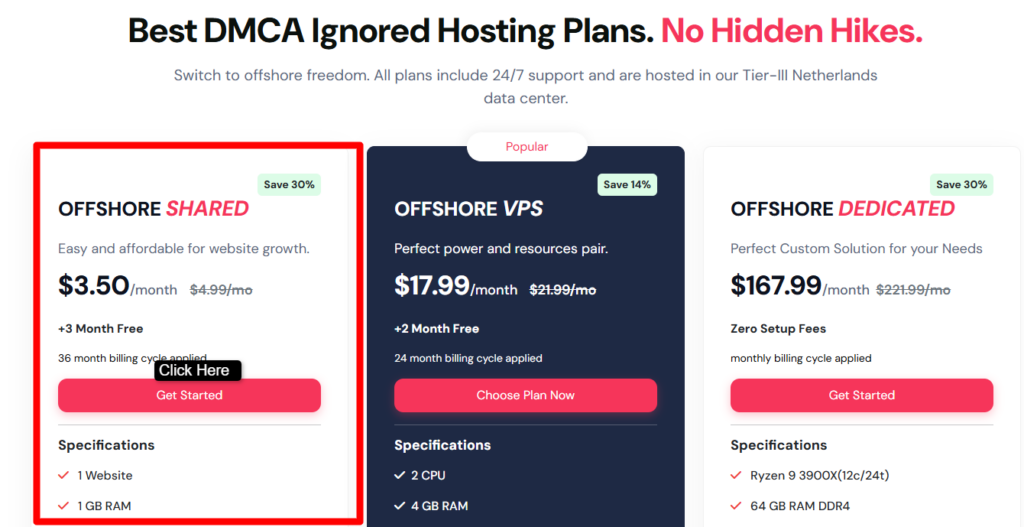
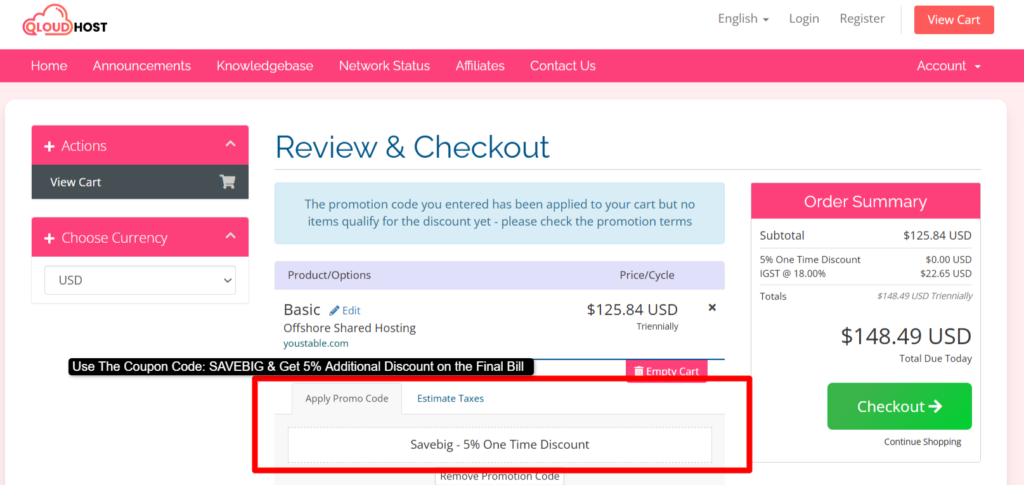
- Select your billing cycle >> Longer plans give a bigger discount >> At checkout, enter the coupon code SAVEBIG to get an additional 10% off your final bill.
- Choose your payment method >> Pay with cryptocurrency for full anonymity.
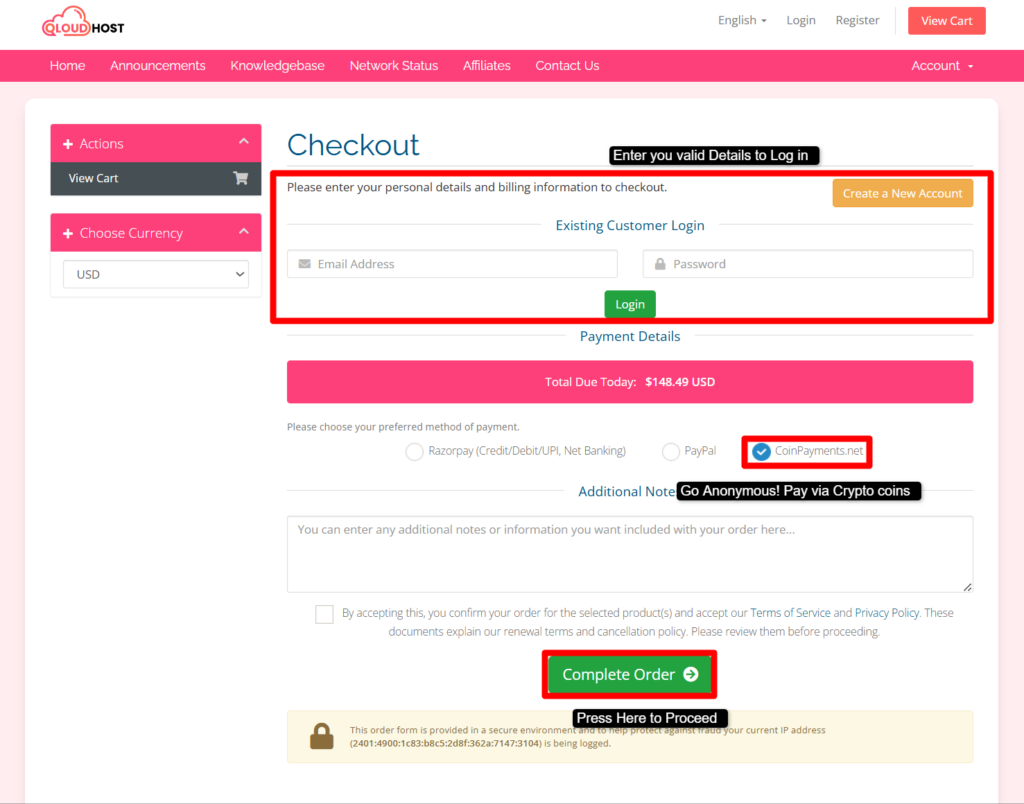
- After payment >> You will receive hosting control panel login details via email
Point your YouStable domain to QloudHost by updating the nameservers in your YouStable domain dashboard.
| PLEASE NOTE: Use coupon code SAVEBIG at checkout on QloudHost to receive an additional 10% discount on your final billing. This code applies on top of any existing offers, making your first year even more affordable. |
Connecting your domain to QloudHost:
Once propagated, your domain will point to your QloudHost server and your website will go live.
Step 4 – Plan the Structure of Your Meme Coin Website
Before designing, map out what pages your meme coin website needs. A well-structured site makes visitors trust your project and understand it fast.
Your site needs to answer four questions within the first 10 seconds of a visit:
| Page | Purpose |
|---|---|
| Home / Landing Page | Hero section with coin logo, tagline and buy button. |
| About Coin | Your coin story, meme origin. |
| How to Buy | Step-by-step guide for buying your coin on a DEX. |
| Community Links | Twitter, Telegram, Discord buttons prominently placed. |
| FAQ | Top questions your audience will have before buying. |
Each section should load fast, look clean and guide visitors toward one action: joining your community or buying your coin.
Keep the language simple and fun. This is a meme coin, not a bank.
Step 5 – Design & Develop the Meme Coin Website
Now the fun part: building your actual crypto website.
You have two routes. Use a website builder or hire a developer.
For most meme coin projects, a website builder is the smarter starting choice. It is faster, cheaper and gets you to live within days.
WordPress is the most common platform used for crypto projects.
On QloudHost, you can install WordPress in one click from the control panel. It gives you thousands of themes and crypto-specific or meme coin templates are available for free.
Key design principles for your meme coin website:
| PLEASE NOTE: Make sure your website loads within 3 seconds on mobile. Use a caching plugin like LiteSpeed Cache (free on QloudHost’s LiteSpeed servers) to speed up your site before launch. Page speed directly affects both user trust and Google rankings. |
Step 6 – Create a Whitepaper That Converts
A whitepaper is a document that explains your meme coin project in detail.
Yes, meme coins need whitepapers too. Even if your coin is 95% a joke, a whitepaper signals that the 5% serious part is real. It is the document that separates credible projects from obvious cash grabs.
Your whitepaper should be 5 to 15 pages. Keep the language accessible. Avoid heavy blockchain jargon unless you explain each term clearly. Your audience is mostly retail investors, not developers.
What to include in your meme coin whitepaper:
Host your whitepaper as a downloadable PDF directly on your QloudHost server. Link to it prominently from your homepage and your navigation menu.
Step 7 – Add Essential Trust Signals
Trust is everything in the meme coin space because scams are everywhere. Your meme coin website needs to visually prove you are legitimate.
Here are the trust signals every credible crypto project displays:
How Much Does It Cost to Start a Meme Coin Website?
One of the biggest myths about launching a meme coin website is that it costs a fortune. It does not.
Here is a realistic cost breakdown for a beginner launching their first project:
| Item | Cost (It is just a Range) |
|---|---|
| Domain name via YouStable | $5 to $11 per year |
| DMCA-ignored hosting via QloudHost (with SVABIG coupon) | $3.50 per month |
| WordPress crypto theme | $0 to $20 one-time |
| SSL Certificate | Free via QloudHost |
| Logo design via Canva or Fiverr | $0 |
| Whitepaper writing (if outsourced on Fiverr) | $0 to $5 |
| Token launch on Pump.fun (Solana) | Around $2 in SOL fees |
| Total (approximate) | $40 for a solid launch |
Notice how the website itself costs almost nothing.
Domain plus hosting is under $20 for the first year using the SAVEBIG coupon on QloudHost. The bigger costs are the audit and token creation, but even those are optional at the very start.
You can get your meme coin website live for under $40 in the first month. With QloudHost’s DMCA-ignored infrastructure, you are also protected from takedowns from day one.
Common Mistakes to Avoid When Starting a Meme Coin Website
I have seen dozens of meme coin projects fail not because of bad concepts but because of avoidable website mistakes. Let me save you from the most common ones.
- Using regular shared hosting: Hosting your meme coin site on Bluehost or SiteGround is asking for trouble. These providers will shut you down at the first DMCA notice. Use offshore DMCA-ignored hosting from QloudHost instead.
- No SSL certificate: A site without HTTPS shows a scary Not Secure warning in browsers. Crypto buyers will immediately distrust your project. Activate your free SSL through the control panel before you launch.
- Not hiding your WHOIS information: Your domain registration info is public by default. Anyone can look up who owns your domain. Enable WHOIS privacy through YouStable to keep your personal details off the public record.
- Skipping the whitepaper: Many meme coin founders think a whitepaper is unnecessary because it is just a meme. That is wrong. Serious buyers and exchange listers want to see a whitepaper. Even a basic 5-page document builds trust.
- No clear buy button on the homepage: Your visitors should find the buy button within 3 seconds of landing on your page. If they have to scroll to find it, you are losing buyers. Place it above the fold in your hero section.
- Missing community links from the homepage: Telegram and X links in your header and hero section, not in the footer. Your community is your product. Make it visible from the very first second.
- Ignoring mobile users: Most crypto community members are on their phones. If your site looks bad on mobile, you destroy trust instantly. Test every page on at least three different screen sizes before going live.
| DISCLAIMER This guide is for educational purposes only. Launching a meme coin involves legal, financial, and technical risks. Always consult a qualified legal and financial professional before launching any cryptocurrency project to the public. |
Checklist Before Launching Your Meme Coin Website
Use this checklist before you go live. Do not hit the launch button until every item is confirmed.
- Domain and Hosting
• Domain registered on YouStable with WHOIS privacy enabled
• DMCA-ignored hosting activated on QloudHost using coupon code SVABIG for 10% off
• Nameservers updated on YouStable pointing to QloudHost
• SSL certificate activated and HTTPS working on all pagesWebsite loads in under 3 seconds on mobile - Content and Pages
• Homepage with hero section, coin logo, tagline, and buy button above the fold
• How to Buy page with step-by-step instructions for first-time buyers
• Whitepaper available as a downloadable PDF - Trust Signals
• Liquidity lock proof linked on the homepage
• CoinGecko or CoinMarketCap listing applied for - Community and Social
• Telegram group created and linked from header
• Twitter/X account created and linked from header
• Discord server created (optional but recommended for larger projects) - Technical and SEO
• Meta title and description set for the homepage
• Google Search Console account created and site submitted
• Sitemap generated and submitted
• 404 error page customized with brand design
Keep on Marking the checklist once you complete the step. By the time you complete all the steps, you’ll have a perfect uninterrupted Meme coin website.
FAQs – How to Start Meme Coin Website?
Is it legal to start a meme coin?
Yes, creating and launching a meme coin is legal in most countries. The legality depends on how you market it and what claims you make. Never promise returns or guaranteed profits. Label your project clearly as high risk.
How much money do I need to start a meme coin website?
You can get your meme coin website live for as little as $40 in the first month. Domain registration on YouStable costs around $5 to $11 per year. Hosting on QloudHost starts at $3.50 per month, and with the SVABIG coupon you get an additional 10% off.
Can I sell my own meme coin?
Yes, you can create and sell your own meme coin. You do this through decentralized exchanges called DEXs, such as Raydium on Solana or Uniswap on Ethereum. After creating your token, you add liquidity to a trading pool and your coin becomes tradeable.
What are the best meme coins?
The top meme coins are Dogecoin (DOGE), Shiba Inu (SHIB), Pepe (PEPE), Floki (FLOKI) and Bonk (BONK). Dogecoin and Shiba Inu are the most established.
Are meme coins taxable?
Yes, meme coins are taxable in most countries. In the U.S., crypto transactions including meme coin trades are treated as capital gains events. You must report profits from buying and selling meme coins on your tax return.
What is the Best Hosting Provider for a Meme Coin Website?
QloudHost is the best hosting provider for a meme coin website. They offer DMCA-ignored offshore hosting based in Amsterdam, Netherlands, starting at $3.50 per month. Use coupon code SVABIG at checkout for an additional 10% discount on your final bill.
Conclusion – How to Start Meme Coin Website?
A meme coin website, now is more easy to build and is more accessible than ever. The tools exist. The communities are ready. And the market is hungry for the big launch.
Here is a quick recap of everything you need to do to successfully start a meme coin website:
- Define your meme concept and branding before touching any tech.
- Register your domain on YouStable for free WHOIS privacy and affordable pricing.
- Host your site on QloudHost for DMCA-ignored, offshore protection. Use code SVABIG for 10% off.
- Build your site on WordPress with a crypto or meme coin theme.
- Add trust signals: SSL, audit badge, liquidity lock proof, and contract address.
Check every box on the pre-launch checklist before going live.
The combination of YouStable for domain registration and QloudHost for DMCA-ignored hosting gives your meme coin website the best chance of staying online through anything. Takedown notices bounce off. Your community stays intact. Your launch succeeds.
| PLEASE NOTE Always approach the meme coin space with caution. The market is highly volatile. Build your community authentically, be transparent about risks and never promise financial returns. The coupon code SVABIG on QloudHost is provided as a reader benefit. |